
Microsoft Brings Linux-Style Coreutils Commands to Windows
Microsoft released Coreutils for Windows, bringing familiar Linux-style commands like ls, cat, cp, grep, and rm to Windows as native tools. Built on the Rust-based uutils project, it helps developers move between Windows, Linux, macOS, and WSL with fewer workflow changes.
Microsoft has released Coreutils for Windows, a new Microsoft-maintained package that brings many familiar Linux and Unix-style command-line utilities to Windows as native applications.
Announced as part of Microsoft Build 2026, Coreutils for Windows is designed to make Windows more comfortable for developers who regularly move between Windows, Linux, macOS, WSL, containers, and cloud environments. The goal is to reduce workflow friction by allowing many commonly used commands, flags, and pipelines to behave more consistently across platforms.
Coreutils for Windows is based on the open-source uutils project, a Rust-based, cross-platform reimplementation of GNU Coreutils. Microsoft’s package combines uutils/coreutils, findutils, and a GNU-compatible grep implementation into a single Windows package.
Linux-Style Commands Running Natively on Windows
The package includes many commonly used command-line tools, including commands such as cat, cp, find, grep, hostname, ls, mv, pwd, rm, sleep, tee, and uptime.
Users can install Coreutils for Windows through WinGet with:
winget install Microsoft.Coreutils
Rather than shipping each tool as a completely separate executable, Microsoft uses a single multi-call binary named coreutils.exe. During installation, Windows creates command-specific links such as ls.exe, cp.exe, cat.exe, and rm.exe, all pointing back to the main coreutils.exe file.
When one of those commands is launched, the binary determines which utility to run based on the command name used. This gives users the convenience of individual Linux-style commands while allowing Microsoft to maintain a single executable package.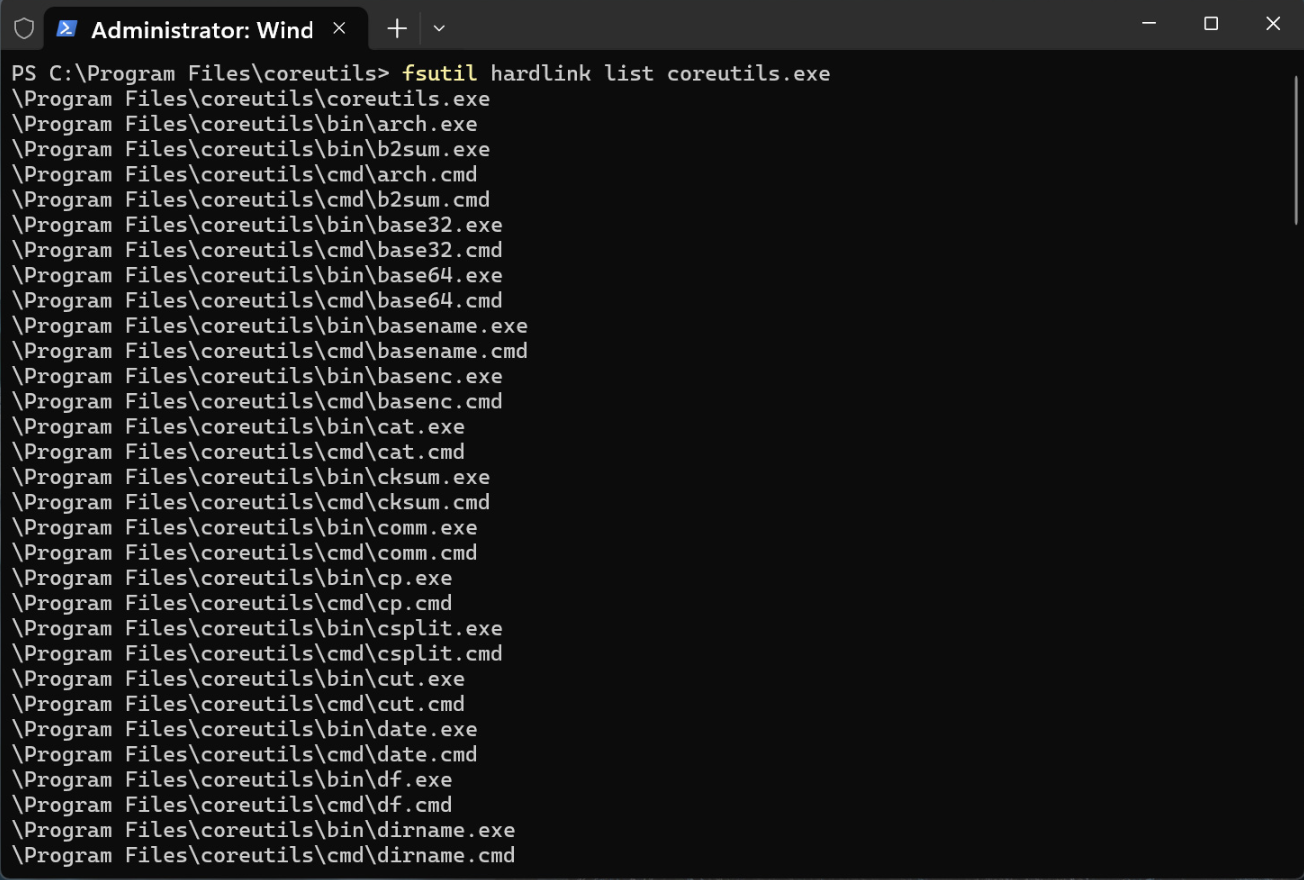
Shell Compatibility and Windows Differences
Because some Linux command names overlap with existing Command Prompt and PowerShell commands, behavior can vary depending on the shell being used, the system PATH order, and PowerShell aliases.
Microsoft notes that some commands are intentionally not included because they conflict with existing Windows commands or rely on POSIX behavior that Windows does not fully support. Differences may also appear around line endings, file permissions, signals, and other platform-specific behavior.
Even with those limitations, Coreutils for Windows gives developers a more consistent command-line experience and makes it easier to reuse scripts and habits from Linux, macOS, and WSL directly on Windows.
Part of a Larger Developer-Focused Windows Push
Coreutils for Windows is part of Microsoft’s broader effort to make Windows a stronger developer platform. At Build 2026, Microsoft also announced WSL containers, a built-in way to create, run, and interact with Linux containers on Windows using native command-line and API tools.
Together, these updates show Microsoft continuing to blur the line between Windows and Linux development workflows, giving developers more flexibility while keeping them inside the Windows environment.

Comments
0 public comments
No comments yet
Be the first to add a comment to this article.
Add a comment
Please sign in to comment on this article.
Sign In